
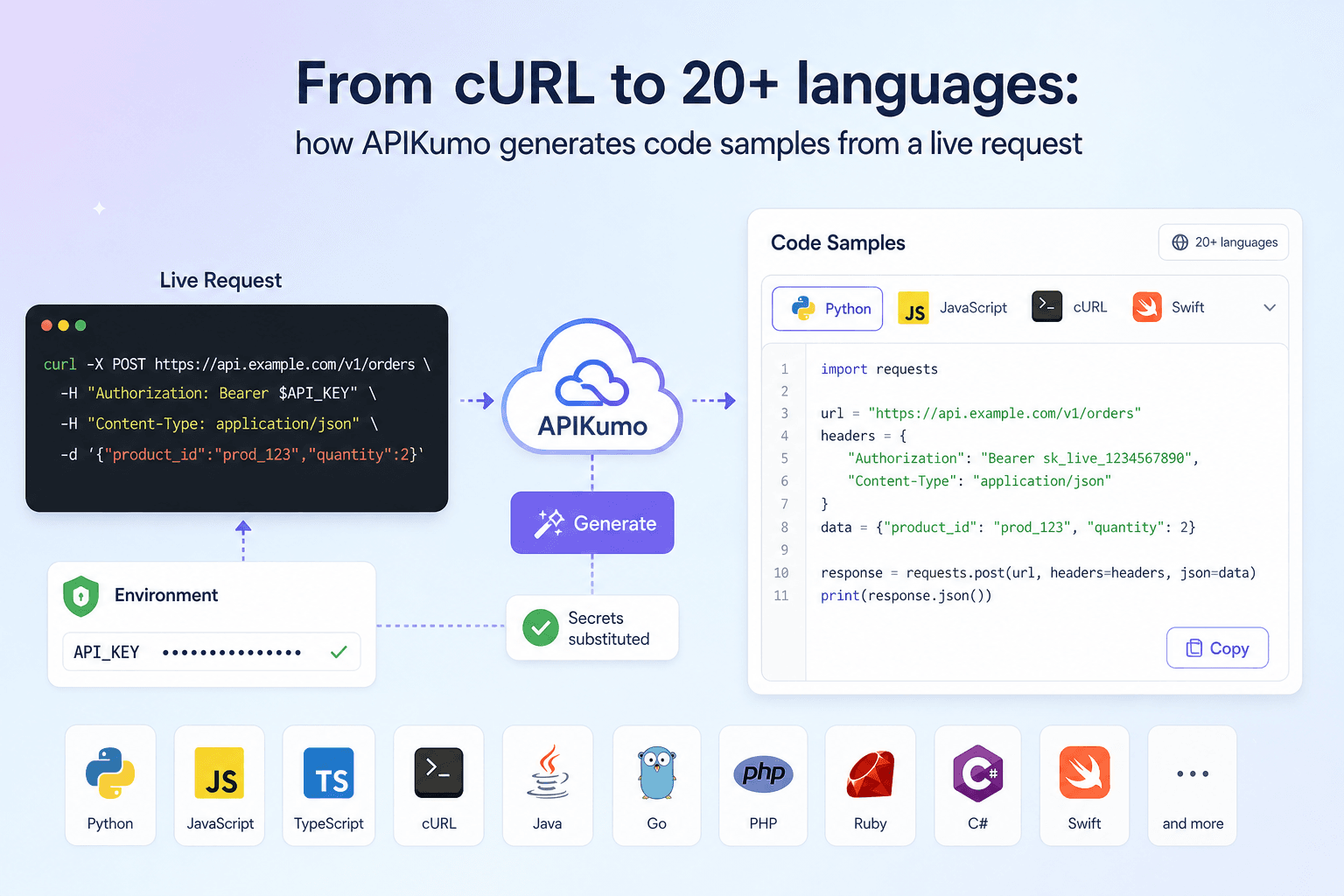
When you ship an API, the first thing most developers ask for is not a schema or a changelog — it is a snippet they can paste and run. Writing those snippets by hand is tedious, error-prone, and out of date the moment an endpoint changes. apikumo solves this by generating code in more than 20 languages and frameworks directly from the request you already built and tested, with your environment variables resolved at generation time so the output is ready to share without any editing.
How code generation fits into the request editor
Every request you save in apikumo — method, URL, query parameters, headers, body, and auth — is the single source of truth for its generated samples. There is no separate configuration step and no template to maintain. Once a request is saved to a collection, the code panel is populated automatically.
The generator reads the live request state: the HTTP method, the fully resolved URL, every header (including auth headers added by your pre-processors), and the request body in whatever mode you chose — JSON, XML, GraphQL, binary, or plain text. It then renders that state into idiomatic syntax for each target language.
The full list of supported targets
The 20+ targets span the languages and HTTP clients your consumers are most likely to reach for:
- Shell: cURL, HTTPie, wget, raw HTTP/1.1
- JavaScript / Node: Fetch, Axios, jQuery, XHR, Node native
http,request,unirest - Python: Requests,
http.client - Java: OkHttp, Unirest
- Mobile / Desktop: Swift URLSession, Objective-C, C# / RestSharp
- Systems / Other: Go, PHP cURL / Guzzle, Ruby, R, C / libcurl, OCaml, PowerShell
If your consumers span multiple platforms — a mobile team on Swift, a data science team on R, and a backend team on Go — they each get a snippet that reflects their own ecosystem, all generated from the same saved request.
Environment variable substitution: keeping secrets out of shared code
This is the detail that matters most when you share snippets externally. apikumo uses {{variable}} substitution throughout the request editor. A typical auth header might look like this in the editor:
Authorization: Bearer {{API_TOKEN}}
When the generator runs, it resolves each variable against the currently active environment — Local, Staging, or Production, whichever you have selected — and substitutes the value into the output. The generated cURL snippet a reader sees therefore contains the actual resolved value rather than a raw placeholder.
For snippets you intend to publish or share with external consumers, the recommended pattern is to use a dedicated Docs environment whose variables hold safe placeholder values (like your-api-token-here) rather than real secrets. Switch to that environment before copying or publishing, and the output stays safe by design.
Because variables resolve at send-time (and at generation-time), the saved request itself never stores a raw secret. You can commit the collection export to version control without leaking credentials.
Auth processors and how they affect generated samples
apikumo's pre-processors run before the request is sent and can mutate headers, sign payloads, or inject tokens. The code generator captures the post-processor state of the request — the headers and body as they would actually leave the client — so generated samples are accurate even for complex auth schemes.
For example, if you use the HMAC signing pre-processor to add an X-Signature header derived from the request body and a secret key, the generated cURL snippet includes that signature header. A reader copying the snippet sees exactly what a correct request looks like, without needing to understand the signing logic themselves.
For the bearer-from-env pre-processor — which reads a token from an environment variable and injects it as Authorization: Bearer <token> — the generated sample shows the resolved header value, so the reader never needs to wire up the processor themselves.
Publishing samples inside your Docs Site
Code samples do not live only in the workspace editor. Every saved request becomes a docs page automatically on your published Docs Site at your-name.apikumo.com. The docs page surfaces the method, URL, parameters, schemas, and the generated code samples for all targets — no extra writing required.
Readers can also use the Try-it panel embedded in the published docs to call your endpoint directly from the page, using the same environment-aware variables and auth processors you configured. The Try-it panel and the code samples therefore always agree with each other: they are both driven by the same saved request.
If you want only certain consumers to access the samples, the Restricted visibility mode limits the published site to allowlisted email addresses after sign-in. The Open mode gives anyone with the link access, which is the right choice for public developer documentation.
Keeping samples up to date as your API evolves
The biggest maintenance burden with hand-written snippets is keeping them current after an endpoint changes. Because apikumo's code samples are generated from the live request, updating a snippet is the same action as updating the request itself:
- Open the request in the editor.
- Change the method, URL, headers, body, or auth as needed.
- Save — the generated samples update immediately.
- If you are ready to ship a new version of the docs, use the Versions and changelog feature to snapshot the collection before you publish. Readers can see exactly what changed between versions.
There is no separate snippet file to edit, no documentation build step to trigger, and no risk of the sample falling out of sync with the actual endpoint behaviour.
Exporting samples for other workflows
Beyond the in-app code panel and the published Docs Site, apikumo offers several export paths:
- Per-request cURL and fetch exports are available directly from the workspace, useful for dropping a snippet into a README or an internal wiki.
- OpenAPI 3 export lets ecosystem tools (Stoplight, Redoc, Swagger UI) render their own code samples from the same source of truth.
llms.txtand Markdown exports on the published subdomain mean AI agents and LLM-driven developer tools can fetch the API surface — including request shapes — without any auth headers, and generate their own idiomatic snippets on top of your documented structure.- The MCP endpoint per published collection lets Claude, Cursor, Continue, and similar tools read your API surface and call it directly, which is particularly useful when a developer is asking an AI assistant how to integrate with your API.
A practical workflow for API publishers
Putting it all together, a typical workflow for a team publishing integration snippets looks like this:
- Build and test the request in the workspace using a Local or Staging environment with real credentials.
- Add a Docs environment with placeholder variable values (
{{API_TOKEN}}→your-api-token-here) so generated samples are safe to share. - Switch to the Docs environment and verify the generated samples in the code panel look correct.
- Publish the collection to your
your-name.apikumo.comDocs Site with Open or Restricted visibility. - Share the permalink for each endpoint — readers get the sample in their preferred language immediately, and the Try-it panel lets them test without leaving the page.
- When the endpoint changes, update the request, snapshot a version, and republish. The changelog tells readers what shifted.
Code samples are one of the highest-leverage things you can provide to developers integrating with your API, and the gap between a sample that works and one that is slightly wrong can cost hours of debugging. By generating samples from the same request you already tested — with variables resolved and auth headers included — apikumo removes that gap entirely. The snippet in the docs is the request that passed. That is the guarantee worth having.