
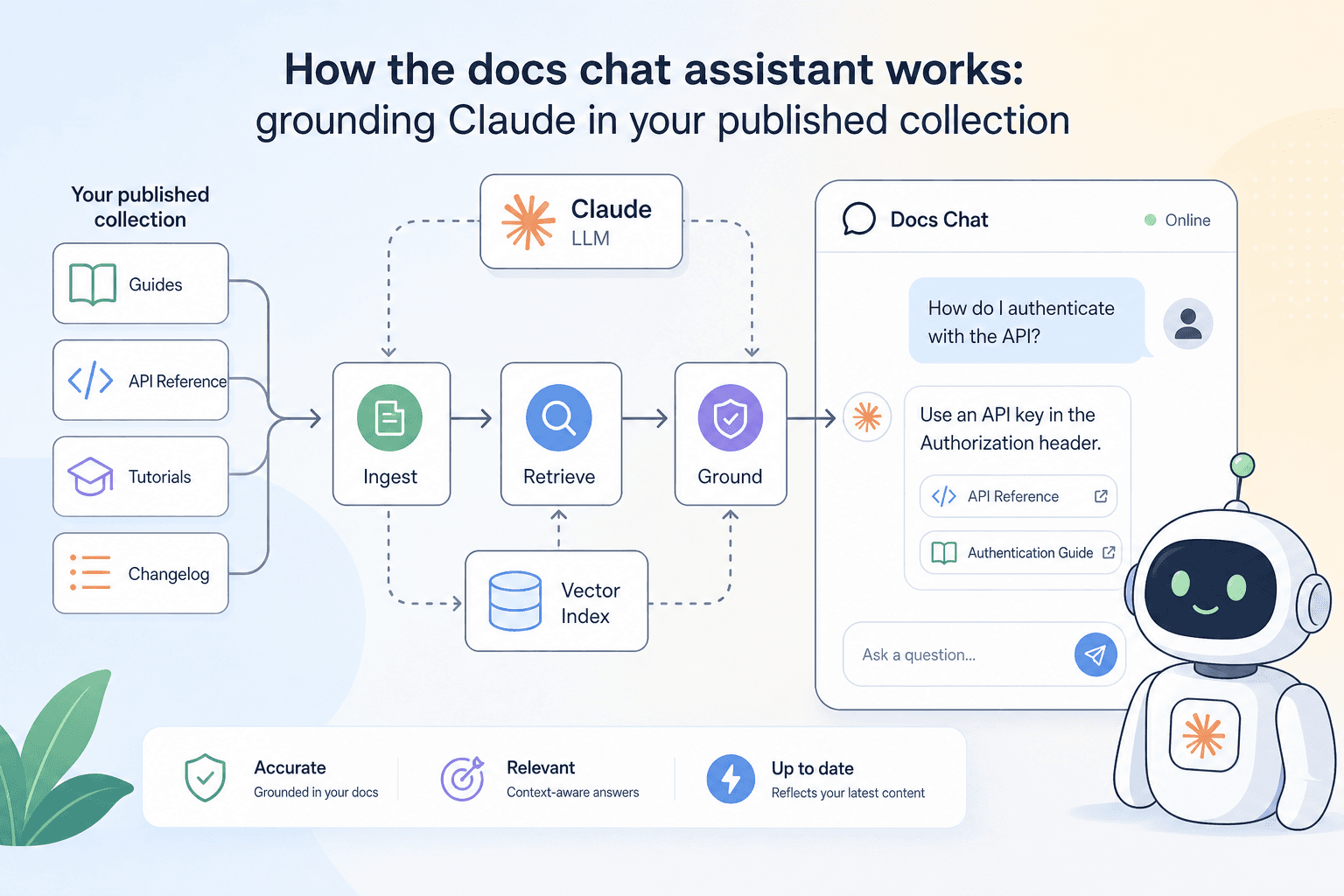
When a developer lands on your published docs site, they rarely read top to bottom. They scan, search, and guess — and when they can't find the answer, they either open a support ticket or give up. The docs chat assistant is our answer to that gap. It sits on every published collection, powered by Claude, and answers questions grounded in the exact schemas and descriptions you've written. No hallucinated endpoints, no generic API advice — just answers drawn from your API surface.
What 'grounded' actually means
"Grounded" is a specific technical claim, so it's worth being precise about it. When a reader asks the chat assistant a question, the assistant doesn't answer from general knowledge about REST APIs or HTTP conventions. It answers from the content of your published collection — your endpoint descriptions, request and response schemas, field names, types, enums, and example values.
In practice, this means:
- If you document a
statusfield as an enum with valuesactive,paused, andarchived, the assistant knows those are the only valid values and will say so. - If you describe a field as deprecated, the assistant can surface that warning when a reader asks about it.
- If an endpoint isn't in your collection, the assistant won't invent one.
The grounding is drawn from the same data that powers your published docs pages — schemas, descriptions, parameter tables, and the latest captured responses. There's no separate AI training step and no lag between publishing an update and the assistant reflecting it.
What questions it can answer well
The assistant handles the questions that come up most often in API support channels:
"What fields are required in this request body?" It reads your request schema directly, so it can list required vs. optional fields, their types, and any constraints you've described.
"What does this error response look like?" If you've captured a response and defined a response schema, the assistant can describe the error shape and explain what each field means — provided you've written those descriptions.
"How do I authenticate?" Your auth setup (Bearer, Basic, API-key) is part of the request configuration in your collection. The assistant can walk a reader through the expected header or parameter.
"Is this field still supported?" If you've marked something as deprecated in your schema descriptions or changelog notes, the assistant can surface that.
"Can I filter by X?" If you've documented query parameters with descriptions, the assistant can confirm whether a filter exists and explain its syntax.
It is less useful for questions that are genuinely outside the collection — runtime debugging, infrastructure issues, or business logic that you haven't described anywhere. The assistant won't speculate; it will tell the reader when it doesn't have enough information.
The role your schema descriptions play
This is the part most API producers underestimate: the quality of the assistant's answers is directly proportional to the quality of your schema descriptions.
Consider two versions of the same field definition in the schema editor:
Version A — bare minimum:
field: retry_after
type: integer
Version B — described properly:
field: retry_after
type: integer
description: Number of seconds the client should wait before retrying after a 429 response.
             Omitted when the response status is not 429.
example: 30
A reader who asks "What does retry_after mean?" gets a one-word type from Version A and a complete, accurate explanation from Version B. The assistant can only relay what you've written. It won't guess that retry_after relates to rate limiting if you haven't said so.
The same principle applies to endpoint descriptions, parameter notes, and enum value explanations. Every description you write is investment that pays off every time a reader asks the assistant about it.
Writing descriptions that the assistant can use
You don't need to write documentation for an AI — write it for a human developer who has never seen your API, and the assistant will handle it fine. A few practical habits help:
- State the purpose, not just the type.
stringtells a reader nothing.A URL-safe identifier generated at resource creation time, stable across renamestells them everything they need. - Document the absence of a field. If a field is omitted under certain conditions, say so. The assistant can then answer "when will this field not be present?" accurately.
- Explain enum values individually. Don't just list
pending | processing | complete | failed— add a one-line meaning to each. The schema editor has a dedicated enum description field for exactly this. - Use the endpoint description for intent. The first sentence of an endpoint description should answer "what does calling this endpoint do?" Assume the reader skipped everything else.
- Capture real responses. The latest captured response is part of the grounding context. A realistic response example is worth more than a carefully written description of an edge case nobody will hit.
Versioning and the assistant
When you snapshot a collection and publish a new version, the assistant is grounded in the published version — the one your readers are looking at. That means you can iterate on the next version in your workspace without the assistant picking up half-finished changes or undocumented fields.
The changelog you write when you publish a new snapshot is also available to the assistant. If a reader asks "what changed in v2?", the assistant can draw on your changelog entry rather than inferring changes from schema diffs. This is another place where a few sentences of clear writing pay dividends.
How readers access the assistant
The chat assistant appears on every published docs site automatically — there's nothing to configure. It respects your visibility settings: if your site is set to Restricted, only allowlisted readers who have signed in can use it. If it's Open, any visitor can ask questions. Closed collections don't surface the assistant to anyone but the owner.
Readers interact with it directly on the page, without leaving the docs or switching to a separate tool. It complements, rather than replaces, the structured docs pages — many readers use both, scanning the endpoint reference for specifics and asking the assistant for context or comparison questions.
The MCP endpoint and llms.txt: for agents, not humans
The chat assistant is the human-facing side of our AI-native docs layer. There's a parallel machine-facing side worth knowing about. Every published collection also exposes:
- An MCP endpoint that Claude, Cursor, Continue, and other agent tools can connect to, giving them access to your full API surface.
- A
llms.txtexport and Markdown export available on the same subdomain, without any auth headers, so automated workflows can fetch them on demand. - An OpenAPI 3 export for tooling that speaks the standard format.
These aren't separate products — they're generated from the same collection the chat assistant reads. Write good descriptions once, and they flow into the human chat experience, the machine-readable exports, and any AI agent that connects via MCP.
A practical checklist before you publish
Before you share your docs site link with consumers, run through this quickly:
- Every endpoint has a one-sentence description that states its purpose.
- Required vs. optional fields are marked in the request schema.
- Enum values have individual descriptions, not just a list of raw strings.
- At least one real response is captured per endpoint — not a placeholder.
- Deprecated fields are labelled in the schema description, not just removed silently.
- Your changelog entry for this version summarises what changed in plain language.
None of these steps require extra tooling. They're all handled inside the apikumo schema editor and the collection description fields you already have.
The docs chat assistant doesn't replace thoughtful documentation — it amplifies it. The more clearly you describe your API's intent, constraints, and behaviour, the more useful the assistant becomes for the developers relying on it. Start with the checklist above, publish, and watch the questions your readers actually ask. Their queries are one of the best signals you'll find for where your descriptions still need work.